> ## Documentation Index
> Fetch the complete documentation index at: https://densify-sync-changelog-13.mintlify.site/llms.txt
> Use this file to discover all available pages before exploring further.
# Postman Collection
## Postman Collection
Kubex provides a Postman collection of sample API requests for public cloud and containers.
Follow the steps below to use the downloaded Postman collection:
1. Unzip the downloaded file and import both the **Kubex API Collection** collection and **Kubex Environment** variables into your Postman workspace.
2. Modify the variables in the **Kubex Environment** to match your Kubex settings and credentials.
If you already have a **Kubex** environment in your Postman application, you can either delete the previous version or rename it. Otherwise, you will have duplicate Kubex environments after the new collection is imported.
3. Review the **Documentation** section of the collection for an overview of the workflow and API requests.
4. Use this sample collection to familiarize yourself with Kubex API requests.
### Troubleshooting the Postman Collection
When using token-based authentication you need to request a token for each session. Subsequent API requests within the session are automatically authenticated with this token. Then in a future session you need to again request and acquire a token.
Postman is only intended to provide the tools for learning and testing Kubex APIs.
Once you are comfortable with how the Kubex API works you can start to place the API calls within your code, used to interface with Kubex. For example you could write a call to get all analysis IDs, then loop through each ID making another API call to get the associated recommendations, thus providing the full list of recommendations for the scope of systems.
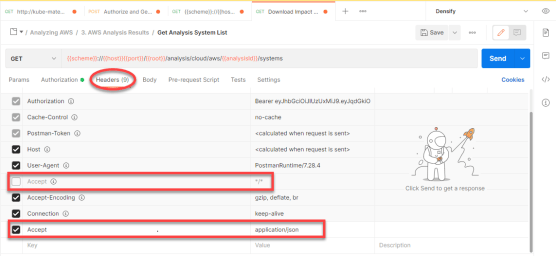
If you use Postman v9.x or later you may encounter a "Bad request, invalid accept header" error. This is due to the fact that the Kubex API does not currently support the **Accept** key value "\*/" for **Headers**.
Set the **Accept** key value to "application/json".