> ## Documentation Index
> Fetch the complete documentation index at: https://densify-sync-changelog-13.mintlify.site/llms.txt
> Use this file to discover all available pages before exploring further.
# GPU Optimization in Kubex
Kubex provides advanced GPU optimization capabilities for Kubernetes environments running AI and machine learning workloads. The platform continuously analyzes GPU utilization, GPU memory consumption, workload density, and infrastructure efficiency to help organizations reduce GPU cost, improve utilization, and maximize AI infrastructure yield.
## Overview
GPU infrastructure is significantly more expensive than traditional CPU and memory resources, yet many AI workloads consume only a fraction of the GPU resources allocated to them.
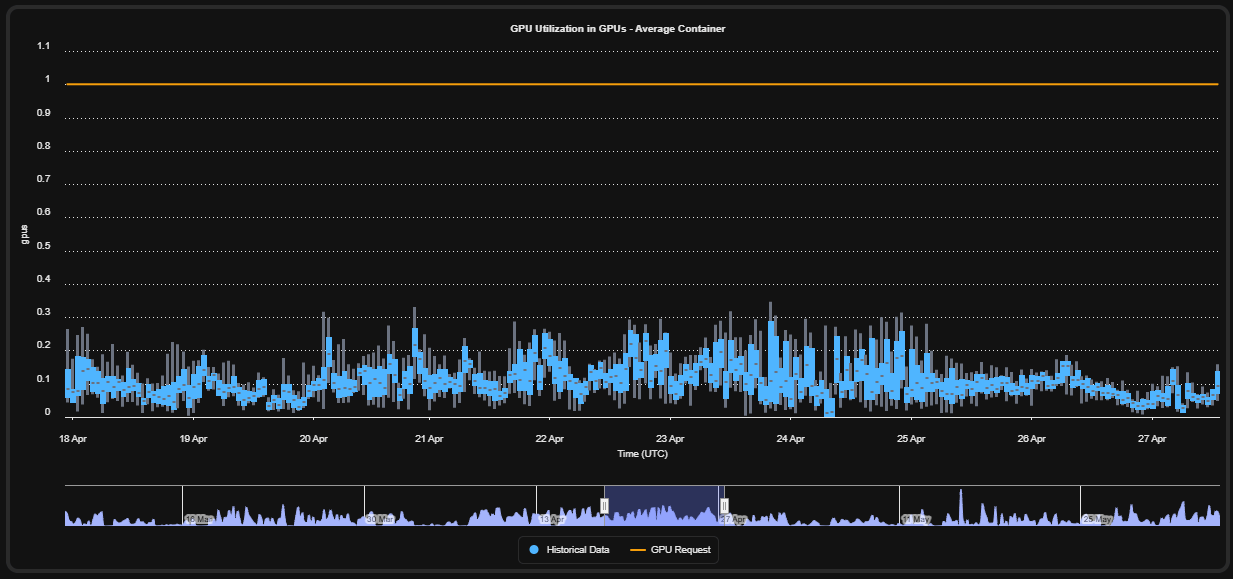 Kubex addresses this challenge by:
* Continuously monitoring GPU workloads
* Analyzing utilization patterns
* Identifying underutilized GPUs
* Detecting inefficient workload placement
* Recommending workload consolidation strategies
* Optimizing GPU density and infrastructure selection
Kubex focuses on increasing GPU yield while maintaining application performance and response time objectives.
## GPU Workload Visibility
Kubex automatically identifies containers consuming GPU resources and separates GPU spend from standard CPU and memory infrastructure costs.
The platform provides:
* GPU-specific workload views
* GPU spend analysis
* Per-container GPU allocation visibility
* GPU model identification
* Historical GPU utilization analysis
Kubex addresses this challenge by:
* Continuously monitoring GPU workloads
* Analyzing utilization patterns
* Identifying underutilized GPUs
* Detecting inefficient workload placement
* Recommending workload consolidation strategies
* Optimizing GPU density and infrastructure selection
Kubex focuses on increasing GPU yield while maintaining application performance and response time objectives.
## GPU Workload Visibility
Kubex automatically identifies containers consuming GPU resources and separates GPU spend from standard CPU and memory infrastructure costs.
The platform provides:
* GPU-specific workload views
* GPU spend analysis
* Per-container GPU allocation visibility
* GPU model identification
* Historical GPU utilization analysis
 This allows teams to quickly identify:
* Expensive AI workloads
* Inefficient GPU usage
* Oversized GPU allocations
* Unused GPU infrastructure
## GPU Utilization Analysis
Kubex continuously analyzes multiple dimensions of GPU consumption.
### GPU Compute Utilization
Kubex tracks:
* Average GPU usage
* Peak GPU consumption
* Sustained utilization
* Real-time GPU demand
* Historical usage trends
This helps determine whether workloads are:
* Fully utilizing allocated GPUs
* Underutilizing GPU capacity
* Suitable for consolidation or partitioning
Example findings:
* Workloads averaging 30–50% GPU usage
* Workloads consuming only 10% of a GPU
* Workloads peaking near full GPU capacity
### GPU Memory Utilization
Kubex additionally analyzes:
* GPU memory allocation
* Memory consumption trends
* Peak GPU memory usage
* Sustained memory utilization
This is critical because many AI workloads:
* Consume low GPU compute
* But require large GPU memory footprints
Kubex evaluates both dimensions together to determine safe consolidation opportunities.
### GPU Power Consumption Analysis
Kubex also provides visibility into power usage:
* GPU power utilization
* Consumption patterns
* Operational cycles
This helps organizations better understand:
* GPU efficiency
* Workload intensity
* Resource yield
* Runtime operating behavior
### Historical & Pattern-Based Analysis
Kubex performs continuous historical analysis of GPU workloads.
The platform evaluates:
* Daily operational cycles
* Weekday vs weekend behavior
* Peak activity windows
* Sustained demand periods
* Long-term workload trends
This enables Kubex to distinguish:
* Temporary spikes
* Stable sustained utilization
* Idle periods
* Predictable usage cycles
The result is more accurate optimization decisions compared to static threshold-based approaches.
## GPU Density Optimization
One of Kubex's core optimization goals is improving GPU density.
This allows teams to quickly identify:
* Expensive AI workloads
* Inefficient GPU usage
* Oversized GPU allocations
* Unused GPU infrastructure
## GPU Utilization Analysis
Kubex continuously analyzes multiple dimensions of GPU consumption.
### GPU Compute Utilization
Kubex tracks:
* Average GPU usage
* Peak GPU consumption
* Sustained utilization
* Real-time GPU demand
* Historical usage trends
This helps determine whether workloads are:
* Fully utilizing allocated GPUs
* Underutilizing GPU capacity
* Suitable for consolidation or partitioning
Example findings:
* Workloads averaging 30–50% GPU usage
* Workloads consuming only 10% of a GPU
* Workloads peaking near full GPU capacity
### GPU Memory Utilization
Kubex additionally analyzes:
* GPU memory allocation
* Memory consumption trends
* Peak GPU memory usage
* Sustained memory utilization
This is critical because many AI workloads:
* Consume low GPU compute
* But require large GPU memory footprints
Kubex evaluates both dimensions together to determine safe consolidation opportunities.
### GPU Power Consumption Analysis
Kubex also provides visibility into power usage:
* GPU power utilization
* Consumption patterns
* Operational cycles
This helps organizations better understand:
* GPU efficiency
* Workload intensity
* Resource yield
* Runtime operating behavior
### Historical & Pattern-Based Analysis
Kubex performs continuous historical analysis of GPU workloads.
The platform evaluates:
* Daily operational cycles
* Weekday vs weekend behavior
* Peak activity windows
* Sustained demand periods
* Long-term workload trends
This enables Kubex to distinguish:
* Temporary spikes
* Stable sustained utilization
* Idle periods
* Predictable usage cycles
The result is more accurate optimization decisions compared to static threshold-based approaches.
## GPU Density Optimization
One of Kubex's core optimization goals is improving GPU density.
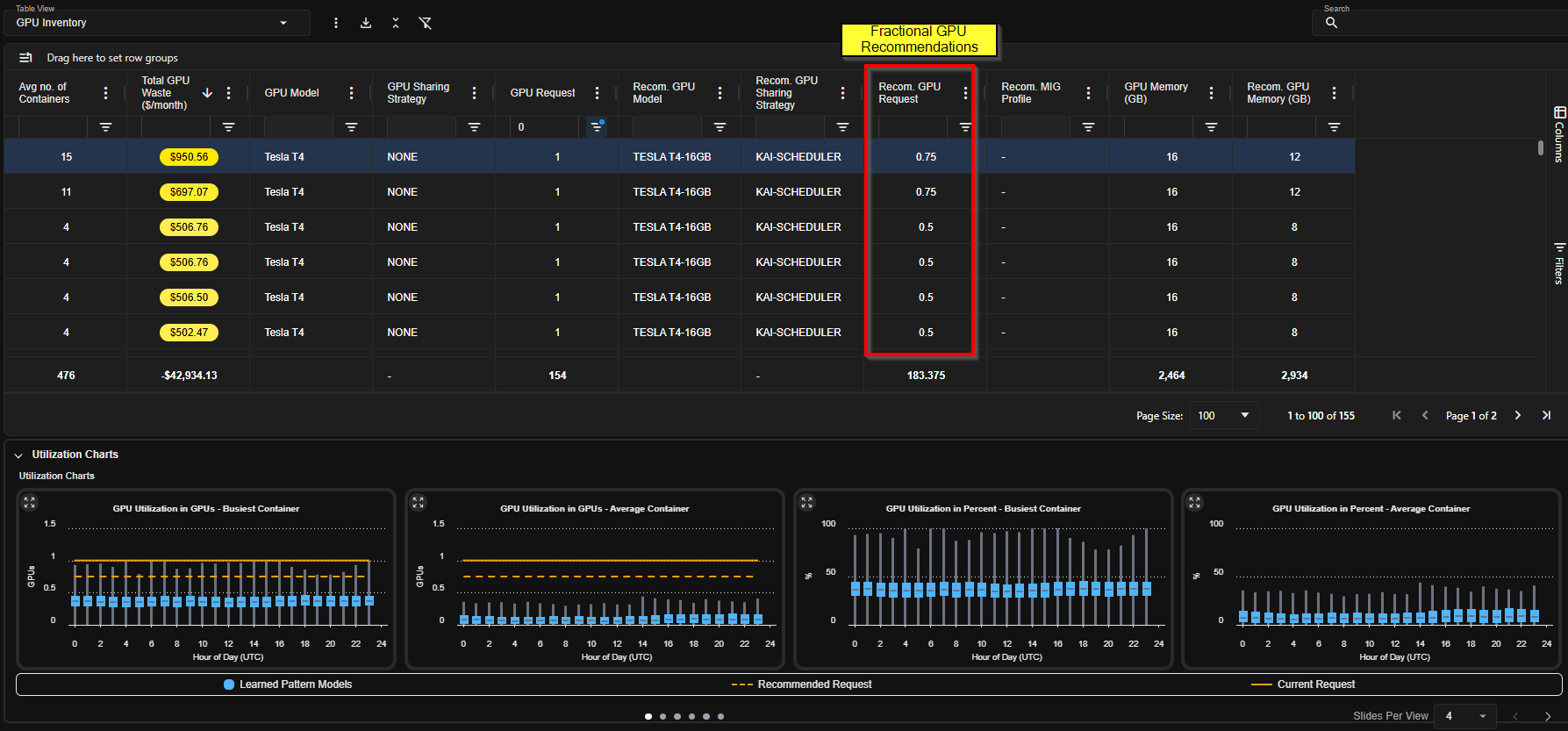 Kubex identifies workloads that:
* Use only a fraction of a GPU
* Can safely share GPU resources
* Are candidates for workload consolidation
Examples include:
* Two workloads each consuming \~50% GPU
* Multiple workloads consuming only 10–20% GPU
Kubex helps organizations consolidate these workloads to:
* Reduce the number of deployed GPUs
* Improve GPU utilization
* Lower infrastructure cost
## GPU Partitioning & Sharing Strategies
Kubex evaluates whether workloads can benefit from GPU sharing technologies.
Supported optimization strategies include:
### Multi-Instance GPU (MIG)
For partitionable GPU models, Kubex can identify opportunities to:
* Split GPUs into multiple isolated partitions
* Run multiple workloads on a single GPU
* Increase infrastructure efficiency
### Fractional GPU Allocation
Kubex can evaluate workloads suitable for:
* Shared GPU execution
* Workload multiplexing
The platform analyzes:
* GPU model capabilities
* Workload demand
* Compute requirements
* GPU memory requirements
* Infrastructure cost tradeoffs
to determine the most efficient deployment model.
## GPU Infrastructure Optimization
Kubex evaluates the relationship between workloads and GPU hardware models.
The platform can compare:
* GPU utilization efficiency
* GPU cost efficiency
* Partitioning capabilities
* Infrastructure suitability
Example optimization decisions:
* Stay on lower-cost GPUs
* Migrate to partitionable GPUs
* Consolidate onto newer GPU architectures
* Reduce total deployed GPU count
Kubex determines the optimal balance between:
* Cost
* Performance
* Density
* Response time
* Resource availability
## Detection of Unused GPUs
Kubex identifies deployed GPU nodes that are not actively running GPU workloads.
These "deadwood" GPUs represent:
* Wasted infrastructure cost
* Idle GPU capacity
* Overprovisioned environments
## Detection of Non-GPU Workloads on GPU Nodes
Kubex also analyzes workload placement efficiency.
The platform detects:
* Containers running on GPU nodes
* But not consuming GPU resources
These workloads may unnecessarily consume:
* Node memory
* CPU capacity
* Storage resources
Removing non-GPU workloads from GPU node groups allows:
* Higher GPU workload density
* Better cluster efficiency
* Reduced infrastructure waste
## Optimization Objectives
Kubex GPU optimization focuses on several key objectives:
| Objective | Description |
| ---------------------------- | --------------------------------------------- |
| Increase GPU Utilization | Improve overall GPU yield |
| Reduce GPU Waste | Eliminate idle or underutilized GPUs |
| Improve Workload Density | Consolidate compatible workloads |
| Optimize Infrastructure Cost | Lower GPU infrastructure spend |
| Improve Placement Efficiency | Ensure GPU nodes host GPU workloads |
| Maintain Performance | Preserve response times and workload behavior |
## Business Impact
GPU infrastructure often represents a disproportionate share of Kubernetes infrastructure cost.
Kubex commonly identifies opportunities to:
* Reduce GPU cost by up to 50%
* Consolidate workloads
* Eliminate idle GPU resources
* Improve utilization efficiency
* Increase AI infrastructure scalability
This enables organizations to operate AI and machine learning platforms more efficiently while controlling rapidly growing GPU spend.
Kubex identifies workloads that:
* Use only a fraction of a GPU
* Can safely share GPU resources
* Are candidates for workload consolidation
Examples include:
* Two workloads each consuming \~50% GPU
* Multiple workloads consuming only 10–20% GPU
Kubex helps organizations consolidate these workloads to:
* Reduce the number of deployed GPUs
* Improve GPU utilization
* Lower infrastructure cost
## GPU Partitioning & Sharing Strategies
Kubex evaluates whether workloads can benefit from GPU sharing technologies.
Supported optimization strategies include:
### Multi-Instance GPU (MIG)
For partitionable GPU models, Kubex can identify opportunities to:
* Split GPUs into multiple isolated partitions
* Run multiple workloads on a single GPU
* Increase infrastructure efficiency
### Fractional GPU Allocation
Kubex can evaluate workloads suitable for:
* Shared GPU execution
* Workload multiplexing
The platform analyzes:
* GPU model capabilities
* Workload demand
* Compute requirements
* GPU memory requirements
* Infrastructure cost tradeoffs
to determine the most efficient deployment model.
## GPU Infrastructure Optimization
Kubex evaluates the relationship between workloads and GPU hardware models.
The platform can compare:
* GPU utilization efficiency
* GPU cost efficiency
* Partitioning capabilities
* Infrastructure suitability
Example optimization decisions:
* Stay on lower-cost GPUs
* Migrate to partitionable GPUs
* Consolidate onto newer GPU architectures
* Reduce total deployed GPU count
Kubex determines the optimal balance between:
* Cost
* Performance
* Density
* Response time
* Resource availability
## Detection of Unused GPUs
Kubex identifies deployed GPU nodes that are not actively running GPU workloads.
These "deadwood" GPUs represent:
* Wasted infrastructure cost
* Idle GPU capacity
* Overprovisioned environments
## Detection of Non-GPU Workloads on GPU Nodes
Kubex also analyzes workload placement efficiency.
The platform detects:
* Containers running on GPU nodes
* But not consuming GPU resources
These workloads may unnecessarily consume:
* Node memory
* CPU capacity
* Storage resources
Removing non-GPU workloads from GPU node groups allows:
* Higher GPU workload density
* Better cluster efficiency
* Reduced infrastructure waste
## Optimization Objectives
Kubex GPU optimization focuses on several key objectives:
| Objective | Description |
| ---------------------------- | --------------------------------------------- |
| Increase GPU Utilization | Improve overall GPU yield |
| Reduce GPU Waste | Eliminate idle or underutilized GPUs |
| Improve Workload Density | Consolidate compatible workloads |
| Optimize Infrastructure Cost | Lower GPU infrastructure spend |
| Improve Placement Efficiency | Ensure GPU nodes host GPU workloads |
| Maintain Performance | Preserve response times and workload behavior |
## Business Impact
GPU infrastructure often represents a disproportionate share of Kubernetes infrastructure cost.
Kubex commonly identifies opportunities to:
* Reduce GPU cost by up to 50%
* Consolidate workloads
* Eliminate idle GPU resources
* Improve utilization efficiency
* Increase AI infrastructure scalability
This enables organizations to operate AI and machine learning platforms more efficiently while controlling rapidly growing GPU spend.